How it works
Create an account, paste one command on your Linux server, check what will be sent, wait about a minute, then read the audit and fix what matters.
Open source agent
The Linux agent (ghostpsy/agent-linux) is open source so you can verify what runs on the box. The Ghostpsy API and web app are hosted products and are not open source.
Create your account
Register and sign in. You use the dashboard to add machines and read scan results.
Get the command to run
On the dashboard, click + Add Machine to generate a 24-hour bootstrap token. Paste the two-line block on your Linux server (bash, curl, and root required). The agent installs to /usr/local/bin/ghostpsy, runs the first scan, and stores its long-lived agent token at /etc/ghostpsy/agent.conf. Recurring scans run from cron with that token.
agent-linux on GitHubSame shape as the one shown after Add Machine (replace the token with yours)# 1. Export the bootstrap token shown in the dashboard export GHOSTPSY_BOOTSTRAP_TOKEN="your_24h_bootstrap_token_here" # 2. Install /usr/local/bin/ghostpsy (downloads the right binary for your CPU) curl -fsSL https://raw.githubusercontent.com/ghostpsy/agent-linux/main/run-agent.sh | sudo bash # 3. Register this host (runs the first scan) sudo ghostpsy register --bootstrap="$GHOSTPSY_BOOTSTRAP_TOKEN"Preview before anything leaves
The agent prints the outbound JSON under a clear banner—read it before any send. Omitted sections show as a muted ellipsis. After the end banner, the scan posts to the API using the token in /etc/ghostpsy/agent.conf.
Example output (truncated)user@prod-website:~# sudo ghostpsy scan --- Outbound payload (review before any send) --- { "schema_version": 1, "machine_uuid": "fd300000-0000-0000-0000-000000000000", "scan_seq": 3, "hostname": "prod-website", "fqdn": "prod-website.example.com", "components": { "core_system_and_kernel": { "os": { "pretty": "Ubuntu 20.04.6 LTS", "kernel": "5.15.35-1-pve", "kernel_arch": "x86_64", "os_release_id": "ubuntu", "os_release_version_id": "20.04", "os_release_version": "20.04.6 LTS (Focal Fossa)", "os_release_name": "Ubuntu", "platform": "ubuntu", "platform_family": "debian", "platform_version": "20.04", "distro_id": "ubuntu", "distro_version_id": "20.04", "distro_name": "Ubuntu" } }, ... other components ... "security_frameworks_and_malware_defense": { "mac_deep_posture": { "apparmor_status_unavailable": "unavailable" }, "fail2ban_posture": { "present": true, "unit_active_state": "active", "unit_file_state": "enabled", "fail2ban_client_path": "/usr/bin/fail2ban-client", "version_summary": "Fail2Ban v0.11.1", "config_paths_read": [ "/etc/fail2ban/jail.conf", "/etc/fail2ban/jail.local", "/etc/fail2ban/jail.d/defaults-debian.conf" ], "enabled_jails": [ "sshd" ], "jail_section_count_hint": 85, "default_bantime": "600", "default_findtime": "600", "default_maxretry": "3" } }, "other": {} } } --- End payload --- Send this payload to API? [y/N]: _Analysis
Ghostpsy ingests the payload and runs AI analysis. Most runs finish in under a minute; occasionally two.
Your report, in the dashboard
See posture, score, and summaries in the web app. Full findings and exports unlock by plan—details on Pricing.
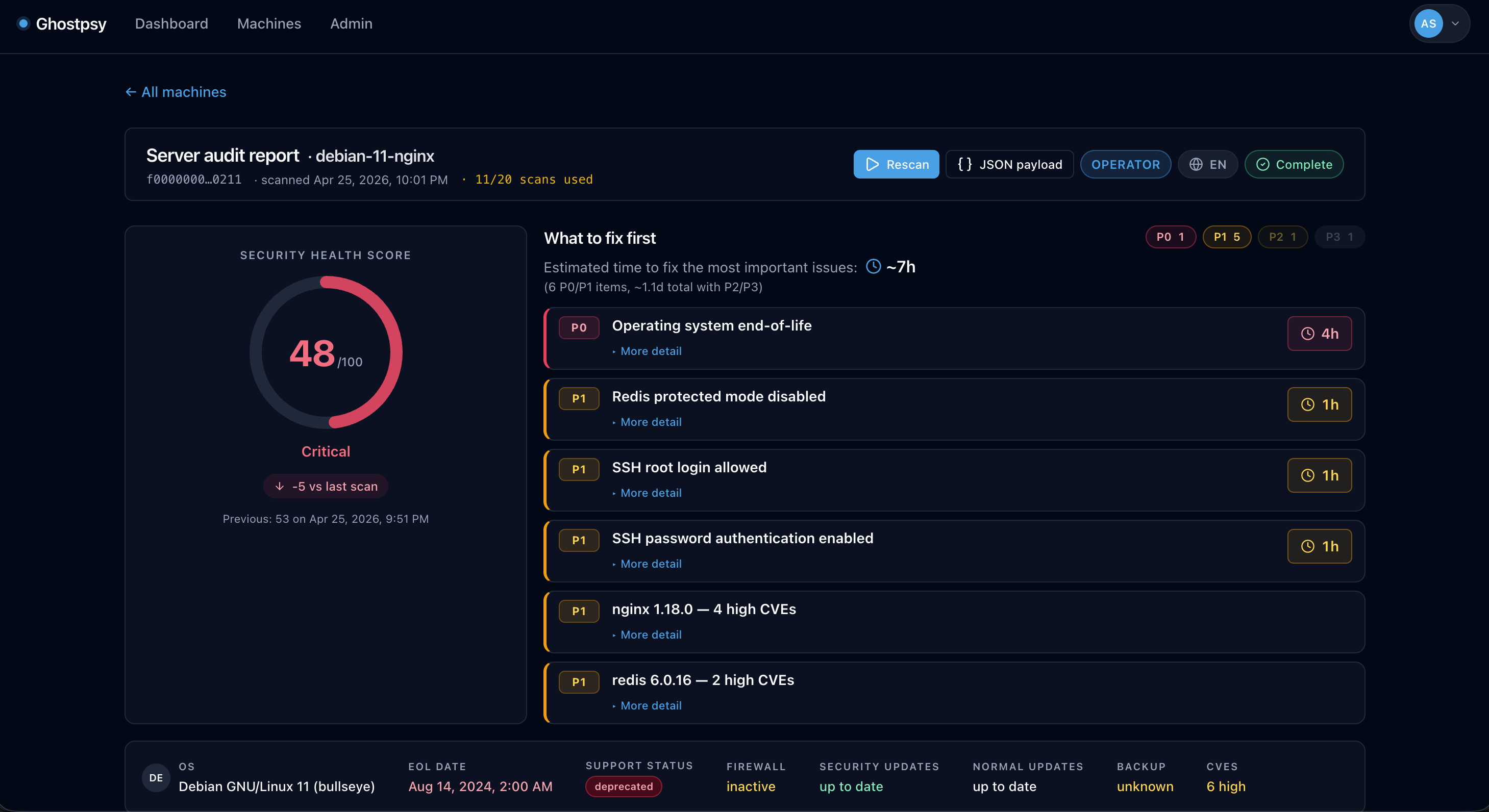
Example audit report. Fix issues
On paid tiers you get ordered remediation, time-to-fix hints, and exports (including Markdown runbooks). Discovery shows a focused slice until you upgrade.
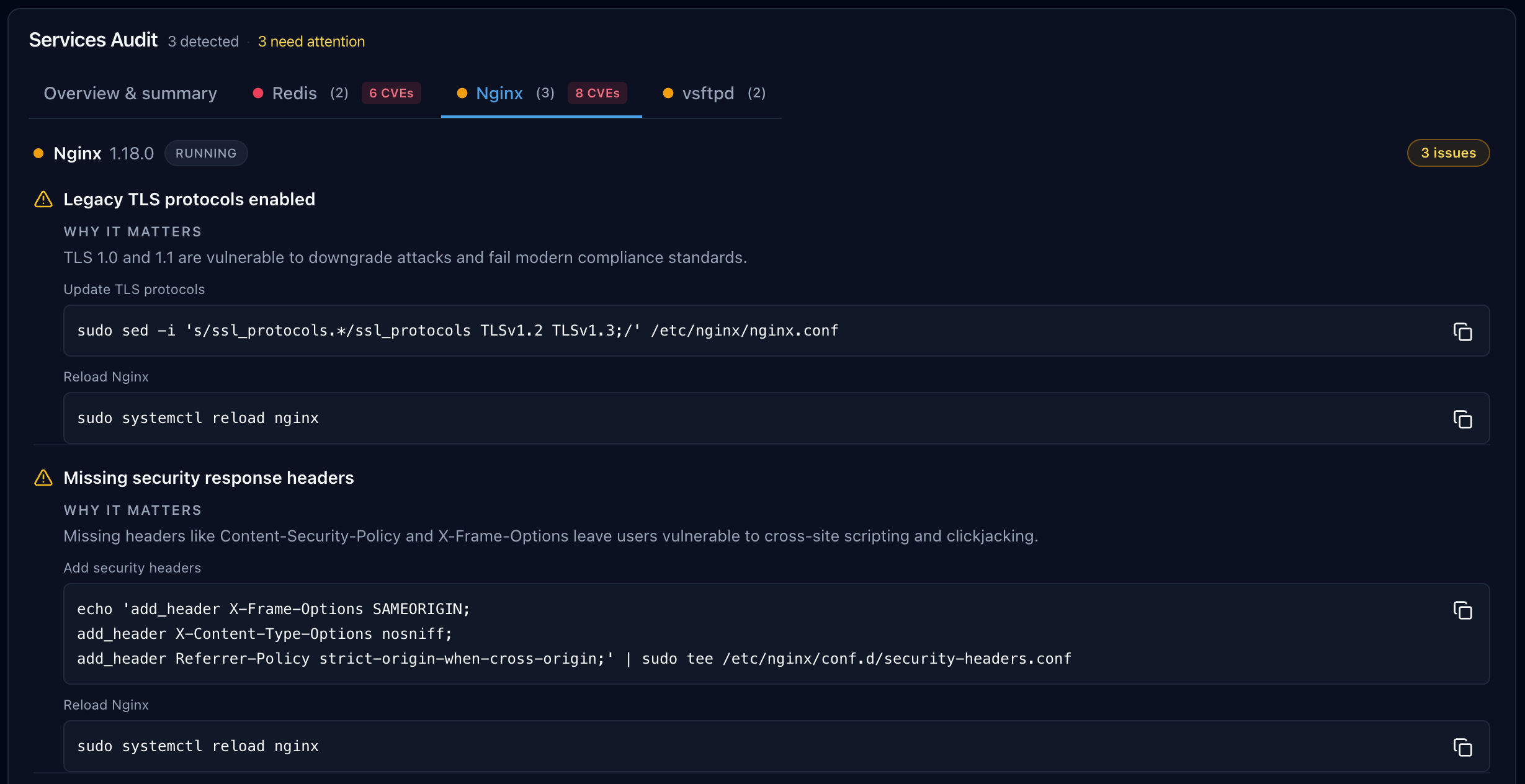
Example remediation view.
Want to try it? Create an account or see pricing.